FLEET OPERATIONS
ENGINE.
The Challenge
Trucking fleets drown in paperwork. Vehicle inspections sit in filing cabinets, Rate Confirmations arrive via email as PDFs, and BOLs get lost between drivers and dispatch. Manual data entry delays factoring submissions, which delays cash flow. Compliance tracking requires cross-referencing spreadsheets. The industry needed intelligent automation, not another data entry clerk.
The System
A suite of three interconnected n8n workflows transforms document chaos into structured data. It captures inspections via Telegram, processes Rate Confirmations through web forms, and matches incoming BOLs using intelligent logic. The system validates signatures, flags damaged cargo, and triggers factoring submissions automatically—creating a real-time compliance dashboard and accelerating financial velocity.
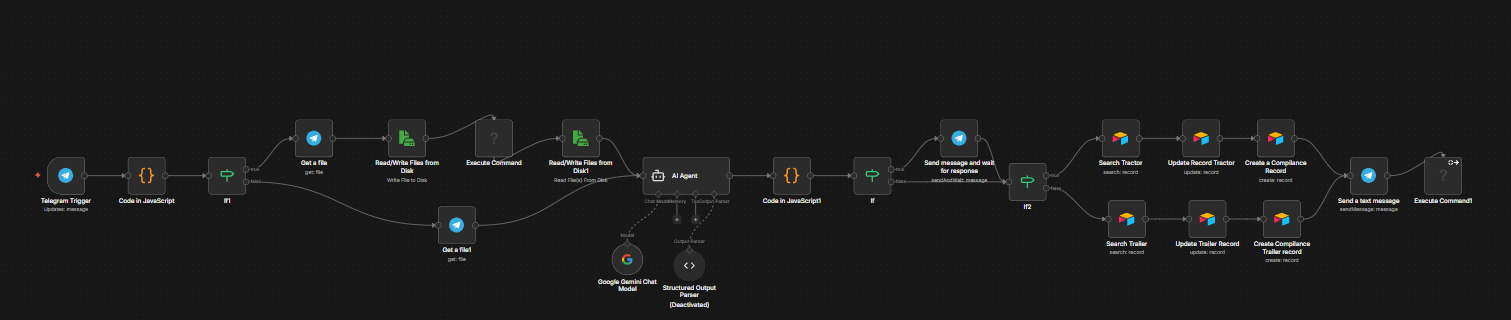
THE ARCHITECTURE
Inspection Logging Pipeline
- Telegram bot receives inspection photos/PDFs from drivers.
- PDF-to-image conversion initializes vision processing.
- Gemini 3 Pro extracts date, vehicle type, and VIN (handwriting recognition).
- JavaScript logic validates unit numbers (correcting OCR errors like 'S'→'5').
- Airtable search matches vehicle records via serial number.
- Compliance log is updated automatically with inspection due dates.
Rate Confirmation Processing
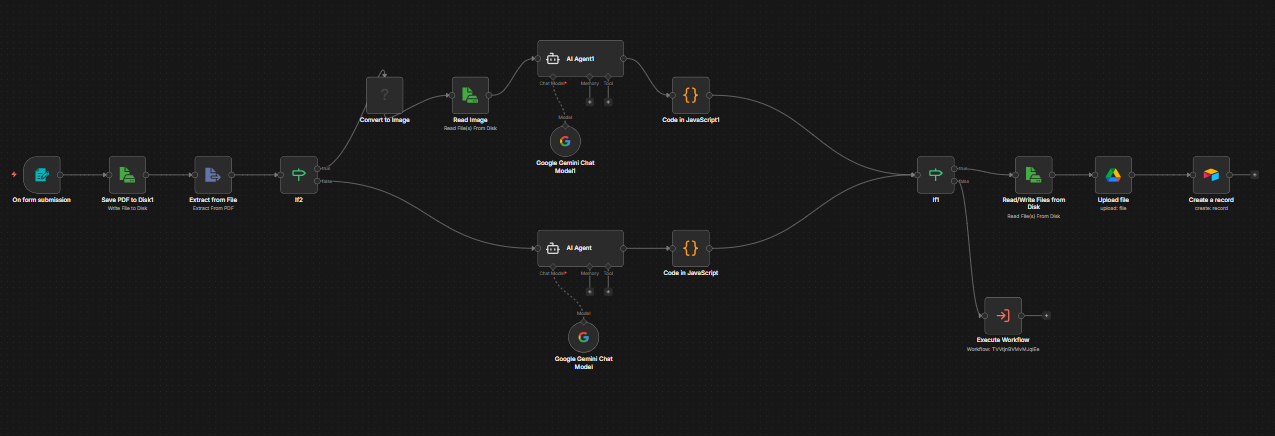
- Web form submission triggers workflow with driver email and Rate Con PDF.
- Text extraction checks quality; switches to Gemini Vision if OCR <50 chars.
- Gemini extracts load ID, origin/destination zips, and financials (linehaul, FSC).
- Confidence scoring flags handwritten corrections for manual review.
- File uploaded to Google Drive with standardized Load ID naming.
- Airtable record created with status: 'Waiting for BOL'.
BOL Matching & Factoring
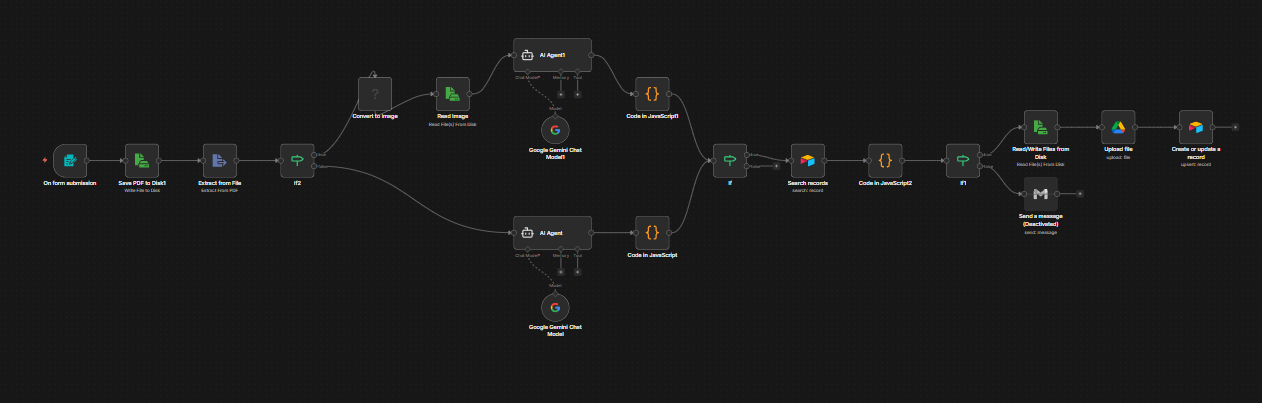
- BOL uploaded via separate web form.
- Gemini extracts reference numbers and validates signatures/barcodes.
- Integrity checks detect missing pages ('Page 1 of 3' indicators).
- Intelligent algorithm matches BOL to loads via ID or zip+date (±2 day tolerance).
- Updates Airtable: 'Ready for Entry' (if clean) or 'BOL Review' (if damaged).
- Triggers factoring submission email when the load packet is complete.
- n8n: Orchestration & Sub-workflows
- Gemini API: Vision (3 Pro) & Text (2.5 Flash)
- Airtable: Fleet Database
- Telegram: Driver Interface
- Google Drive: Doc Storage
Zero manual data entry. Drivers submit inspections from the road via Telegram—the system handles OCR and compliance tracking. The factoring submission process that used to take 45 minutes per load now runs in the background. Fleet managers see real-time dashboards instead of hunting through filing cabinets.